clssrm vs Google Calendar

Don't just share the timetable. Run the classes.

Google Calendar shows when a class happens. clssrm connects that class to its regular students, available places, attendance, replacements, and payment records.

No credit card. No per-student or per-lesson fees.

One connected weekInside clssrm
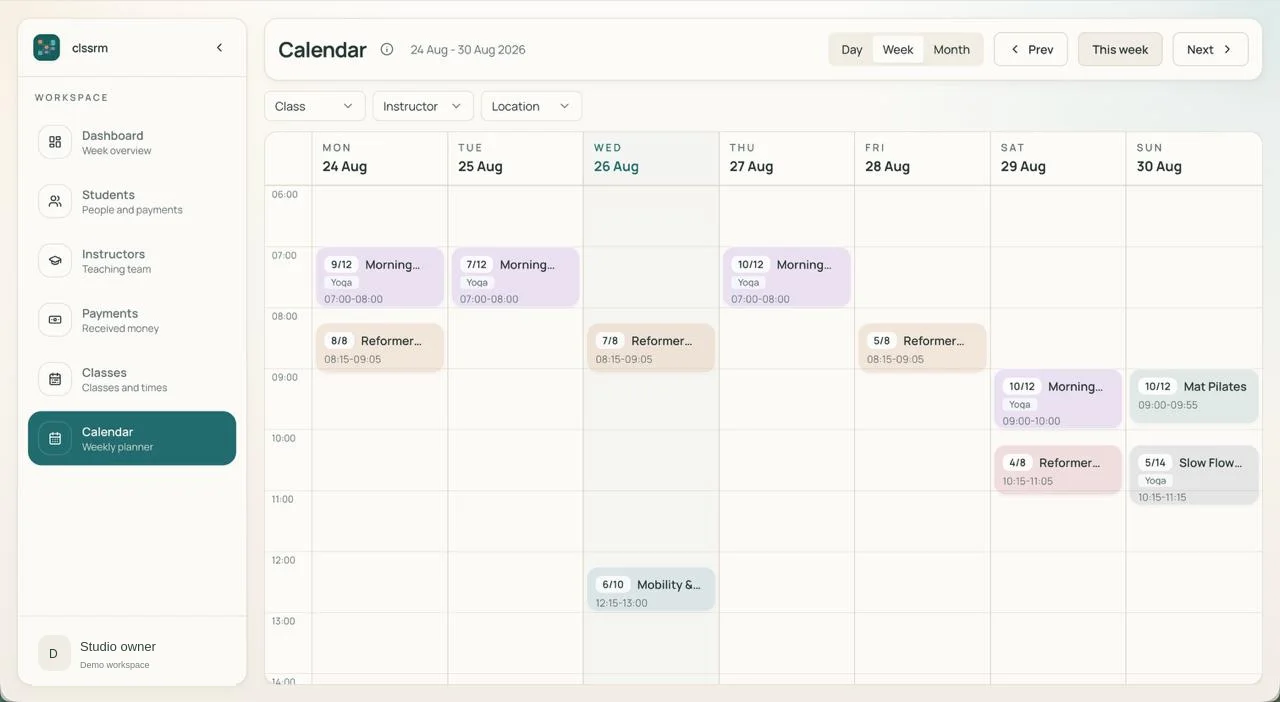
clssrm weekly calendar showing Pilates and yoga classes, booked places, and class and instructor filters
Regular enrollment Available places
Actual clssrm interface with example class data. Open the screenshot for a closer look, or watch the product tour.

The work behind the timetable

The timetable is just the beginning.

clssrm vs Google Calendar: recurring-class management features
FeatureclssrmGoogle Calendar
Recurring weekly timetableBuilt inBuilt in
Recurring student enrollmentBuilt inGuest lists only
Rosters for each class dateBuilt inGuest lists only
Class capacity checksBuilt inNot built in
Enrollment conflict checksBuilt inNot built in
Linked replacement bookingsBuilt inManual tracking
Drop-in bookings & chargesBuilt inSeparate tools
Student attendance historyBuilt inSeparate tools
Monthly charges & balancesBuilt inSeparate tools
Student profiles & historyBuilt inSeparate tools
Instructor roster accessBuilt inCalendar sharing

Built-in feature

Google Calendar has guest lists and appointment availability checks, but not student enrollment or class-capacity workflows. Eligible plans also offer paid appointments through Stripe—not a monthly student ledger.

One student. One change. No lost context.

Tuesday is cancelled. Thursday stays. Friday is the replacement.

A student attends every Tuesday and Thursday. This week, they need to miss Tuesday and take an available Friday place instead.

In a shared calendar, you can change the event's guests. You still need somewhere else to record why the student moved, which missed booking the new place replaces, and what they owe.

In clssrm, cancel Tuesday's dated booking and add a linked replacement on Friday. Thursday and the regular enrollment stay in place. A replacement booking does not add a new charge or change the student's agreed monthly fee.

Explore class rosters and capacity
Mara's class weekIllustrative workflow
  1. Tue

    Cancelled

    This booking only. Enrollment stays.

  2. Thu

    Booked

    The regular weekly place is unchanged.

  3. Fri

    Replacement

    An available place, linked to Tuesday.

Monthly fee unchanged. No additional replacement charge.

clssrm changed how we run the studio. Before, a shared Google Calendar and countless Excel sheets made it hard to track class availability, pending payments, and cancellations. Now everything runs seamlessly, and our Pilates instructors can manage their own class availability.
George Kleovoulou · Physiotherapist · George Kleovoulou Physiotherapy

Keep Google Calendar. Give your classes an operational home.

  1. 01

    Create the class schedule in clssrm

    Set up your existing weekly times with instructors and capacity. Google Calendar events are not automatically imported as classes or enrollments.

    Set up a recurring class
  2. 02

    Connect the people to the timetable

    Add or import your students and select the weekly sessions they attend. Manage each date's drop-ins, cancellations, replacements, and attendance from its roster.

    Explore dated rosters and capacity
  3. 03

    Send your schedule to Google Calendar on Pro

    Pro includes Google Calendar sync, which sends your clssrm schedule events to Google Calendar. Manage classes and bookings in clssrm; this is not a two-way import of your personal calendar.

    Explore the clssrm calendar

Before you switch

Can Google Calendar manage recurring classes?

Google Calendar can show recurring class times and invite guests. clssrm adds recurring student enrollment, dated rosters, capacity checks, linked replacements, attendance history, and student charges and payment records.

Does Google Calendar already offer booking and payments?

Yes. Google Calendar offers appointment booking pages, and eligible paid subscriptions support paid appointments through Stripe. clssrm serves a different need: staff-managed recurring-class operations and payment records. It does not offer student self-booking or process student payments.

Can I use clssrm alongside Google Calendar?

Yes. Pro includes Google Calendar sync, sending your clssrm schedule events to Google Calendar. Class and booking changes are managed in clssrm. It does not import personal calendar events into clssrm or provide two-way editing. Starter does not include Google Calendar sync.

Do I have to change how students pay?

No. Continue collecting payments through your existing arrangements and record them in clssrm with the amount, method, date, and note. Students do not need a clssrm account or a new payment app.

What does clssrm cost as my classes grow?

Starter is €30/month with one staff account; Pro is €100/month with four, including Google Calendar sync. Additional staff seats are €5/month. Prices exclude applicable VAT. There are no per-student or per-lesson fees: your subscription changes when you change plans or add staff, not because you teach more classes. Try it free for one month without a credit card.

Comparison reviewed . Based on clssrm's current workflows and the following official product documentation; third-party features and plan availability can change.

Put your next week of classes in clssrm.

Set up your timetable, enroll your regular students, and see what it feels like when the records belong together. Try it free for one month. No credit card required.

Start your free month

Plans from €30/month, excluding applicable VAT. No per-student or per-lesson fees. Compare plans and staff seats.