clssrm vs Excel & Google Sheets

Your classes need more than a spreadsheet.

Stop maintaining separate sheets for the timetable, student roster, attendance, and payments. clssrm connects them in one workspace built for recurring classes.

No credit card. No per-student or per-lesson fees.

One connected weekInside clssrm
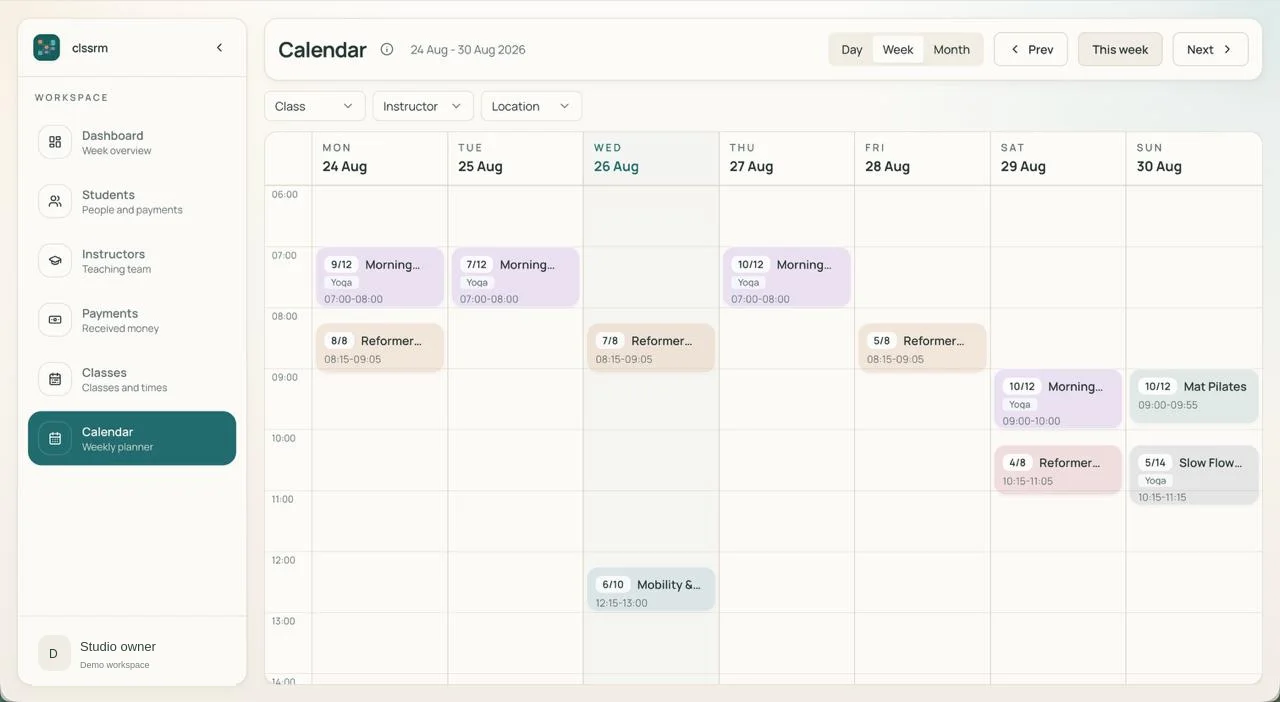
clssrm weekly calendar showing Pilates and yoga classes, booked places, and class and instructor filters
Regular enrollment Available places
Actual clssrm interface with example class data. Open the screenshot for a closer look, or watch the product tour.

The work behind the timetable

Class admin. Without the spreadsheet work.

clssrm vs Excel & Google Sheets: recurring-class management features
FeatureclssrmExcel / Google Sheets
Recurring weekly timetableBuilt inManual setup
Recurring student enrollmentBuilt inManual tracking
Rosters for each class dateBuilt inManual setup
Class capacity checksBuilt inCustom formulas
Enrollment conflict checksBuilt inCustom setup
Linked replacement bookingsBuilt inManual tracking
Drop-in bookings & chargesBuilt inManual tracking
Student attendance historyBuilt inManual tracking
Monthly charges & balancesBuilt inCustom formulas
Student profiles & historyBuilt inManual setup
Instructor roster accessBuilt inFile permissions

Built-in feature

Spreadsheets can support these tasks with your own sheets, formulas, and automation. In clssrm, the class-management workflow is already built in.

One student. One change. No lost context.

Tuesday is cancelled. Thursday stays. Friday is the replacement.

A student attends every Tuesday and Thursday. This week, they need to miss Tuesday and take an available Friday place instead.

With separate sheets, you need to update Tuesday's roster, Friday's roster, the available-place count, and the note explaining the replacement. Those records only agree if your process keeps them in sync.

In clssrm, cancel Tuesday's dated booking and add a linked replacement on Friday. Thursday and the regular enrollment stay in place. A replacement booking does not add a new charge or change the student's agreed monthly fee.

Explore class rosters and capacity
Mara's class weekIllustrative workflow
  1. Tue

    Cancelled

    This booking only. Enrollment stays.

  2. Thu

    Booked

    The regular weekly place is unchanged.

  3. Fri

    Replacement

    An available place, linked to Tuesday.

Monthly fee unchanged. No additional replacement charge.

I spent years getting lost in Excel, Google Sheets, and every custom solution you can think of. Having one dedicated tool to manage class availability and student payments has simplified my day-to-day work, so I can focus on other aspects of the studio.
Emily · Ceramist and product designer · Meltemi Creative Areas

Bring your student list. Leave the spreadsheet upkeep behind.

  1. 01

    Import your students

    Export your student list as CSV, map the columns, and review the rows before importing. This imports student records, not your full timetable, attendance history, or financial workbook.

    See the student CSV import guide
  2. 02

    Set up your recurring week

    Add class times, instructors, and capacity. Enroll each regular student into the weekly sessions they attend instead of copying their name into a fresh roster each week.

    See how recurring enrollment works
  3. 03

    Keep the way you collect payments

    Record charges and payments handled through cash, bank transfer, or your existing payment arrangements. You do not need to connect a payment processor or ask students to create accounts.

    See how payment records work

Before you switch

Can I use Excel or Google Sheets to manage classes?

Yes. Both can hold schedules, rosters, attendance, and payment records, with formulas and automation where needed. clssrm provides those connected class-management workflows without requiring you to design and maintain the spreadsheet system.

Can I import my existing spreadsheet into clssrm?

You can import student records from a CSV file, map its columns, and review rows before importing. First and last names are required. This is not a full workbook migration: recurring schedules, enrollment, historic attendance, and financial records are not imported by the student CSV tool.

Is clssrm useful for tutors and language classes as well as studios?

Yes. Fixed weekly English groups, maths lessons, and studio classes use the same recurring schedule, enrollment, attendance, and payment-record workflows. clssrm manages operations; it does not provide homework, grading, or course materials.

Do my students need accounts, or have to pay through clssrm?

No. Your team manages enrollment and rosters. clssrm records payments collected elsewhere; it does not provide student self-booking or process student payments. Students do not need a clssrm account.

Why pay for clssrm when spreadsheets can be free?

The difference is the operational workflow, not the ability to store rows. clssrm keeps dated rosters, capacity, attendance, and student payment records connected. Starter is €30/month with one staff account; Pro is €100/month with four. Additional staff seats are €5/month. Prices exclude applicable VAT. There are no per-student or per-lesson fees, and the one-month trial requires no credit card.

Comparison reviewed . Based on clssrm's current workflows and the following official product documentation; third-party features and plan availability can change.

Put your next week of classes in clssrm.

Set up your timetable, enroll your regular students, and see what it feels like when the records belong together. Try it free for one month. No credit card required.

Start your free month

Plans from €30/month, excluding applicable VAT. No per-student or per-lesson fees. Compare plans and staff seats.