clssrm vs Mindbody

A simple Mindbody alternative for studios with weekly regulars.

Mindbody is a full booking and payments platform, with client apps, online checkout, and marketing tools. If your students keep the same weekly place and pay you by cash or bank transfer, you may not need all of that. clssrm keeps your weekly schedule, regular places, attendance, and who's paid in one calm workspace for a flat monthly price.

No credit card. No per-student or per-lesson fees.

One connected weekInside clssrm
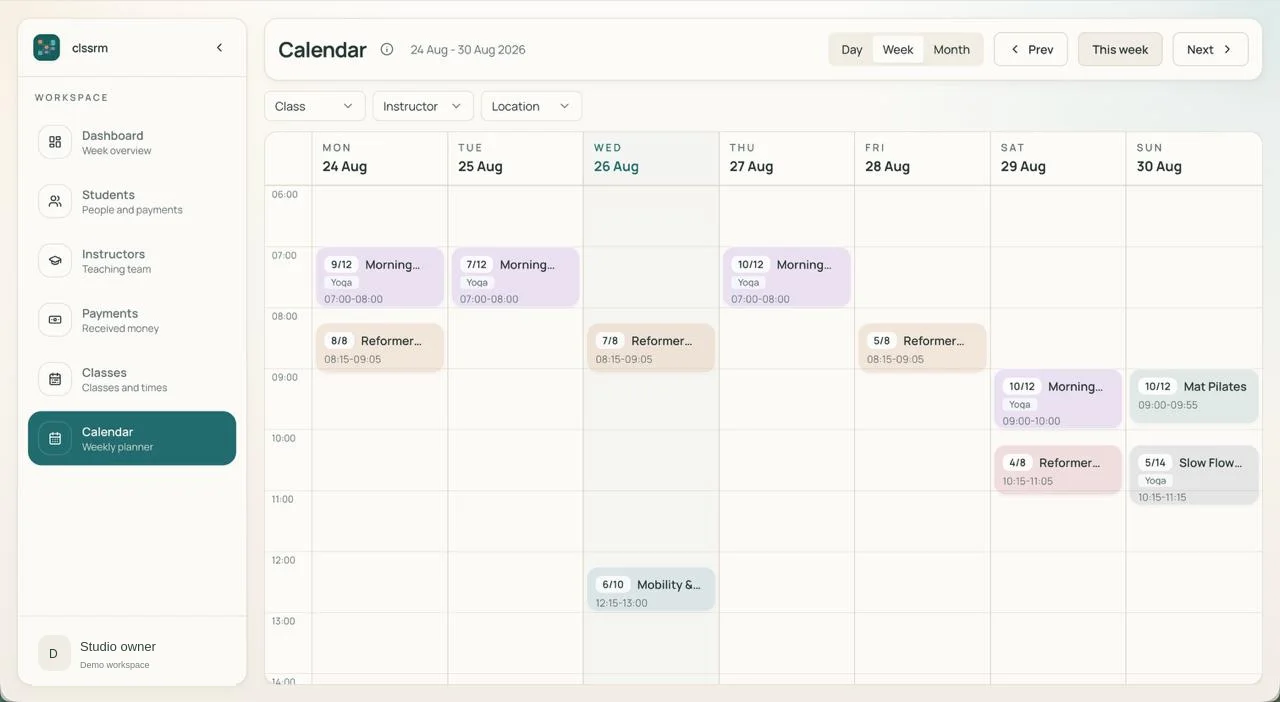
clssrm weekly calendar showing Pilates and yoga classes, booked places, and class and instructor filters
Regular enrollment Available places
Actual clssrm interface with example class data. Open the screenshot for a closer look, or watch the product tour.

The work behind the timetable

Less platform. Just your regular week.

clssrm vs Mindbody: recurring-class management features
FeatureclssrmMindbody
Recurring weekly timetableBuilt inBuilt in
Recurring student enrollmentBuilt inBuilt in
Rosters for each class dateBuilt inBuilt in
Class capacity checksBuilt inBuilt in
Student attendance historyBuilt inBuilt in
Instructor roster accessBuilt inBuilt in
Flat price, no per-student feesBuilt inPlan, location & add-on pricing
No payment processing feesBuilt inFees apply with Mindbody Payments
No client app or account neededBuilt inClient app & online booking
Self-serve setup with a free trialBuilt inSales demo & guided onboarding

Built-in feature

Mindbody offers far more than this table lists, including client self-booking, online payments, marketing, and a consumer app. We've listed what matters most to a small studio with weekly regulars. Mindbody's plans, prices, and features vary by region, so check their current pricing for your country.

One student. One change. No lost context.

Tuesday is cancelled. Thursday stays. Friday is the replacement.

A student attends every Tuesday and Thursday. This week, they need to miss Tuesday and take an available Friday place instead.

A booking platform is designed around clients booking and paying for themselves. If your regulars never book online, you still set up and explain that layer before you get to the roster, the attendance, and who owes what this month.

In clssrm, cancel Tuesday's dated booking and add a linked replacement on Friday. Thursday and the regular enrollment stay in place. A replacement booking does not add a new charge or change the student's agreed monthly fee.

Explore class rosters and capacity
Mara's class weekIllustrative workflow
  1. Tue

    Cancelled

    This booking only. Enrollment stays.

  2. Thu

    Booked

    The regular weekly place is unchanged.

  3. Fri

    Replacement

    An available place, linked to Tuesday.

Monthly fee unchanged. No additional replacement charge.

“clssrm changed how we run the studio. Before, a shared Google Calendar and countless Excel sheets made it hard to track class availability, pending payments, and cancellations. Now everything runs seamlessly, and our Pilates instructors can manage their own class availability.”
George Kleovoulou · Physiotherapist · George Kleovoulou Physiotherapy

Moving a regular week into clssrm.

  1. 01

    Recreate your weekly timetable

    Add class times, instructors, and capacity. Your class data in Mindbody is not imported automatically.

    Set up a recurring class
  2. 02

    Import your students and enroll your regulars

    Import students from a CSV export, then enroll each one in the weekly sessions they attend so they appear on every date's roster.

    Import students from CSV
  3. 03

    Keep collecting payments your way

    Record payments collected by cash, bank transfer, or your existing arrangements. clssrm does not process card payments or automatic membership billing.

    See how payment records work

Before you switch

Is clssrm a full replacement for Mindbody?

Not for every studio. clssrm covers schedules, recurring enrollment, dated rosters, capacity, attendance, and payment records. It does not offer client self-booking, online payments, retail, marketing tools, or a client app.

Can students book or pay online in clssrm?

No. Your team manages rosters and records payments collected elsewhere. Students do not need a clssrm account or app.

Can I move my data from Mindbody?

You can import student records from a CSV file, mapping its columns and reviewing rows before import. Class schedules, enrollments, and historic payments are set up in clssrm rather than imported.

What does clssrm cost?

Starter is €30/month with one staff login; Pro is €50/month with four staff logins, Google Calendar sync, monthly financial reports, and instructor payout calculations. Pro reports include CSV export. Basic data and payment CSV exports are included in both plans. Additional staff seats are €5/month. Prices exclude applicable VAT. There are no per-student or transaction fees, and the 30-day trial requires no credit card.

Comparison reviewed . Based on clssrm's current workflows and the following official product documentation; third-party features and plan availability can change.

Put your next week of classes in clssrm.

Set up your timetable, enroll your regular students, and see what it feels like when the records belong together. Try it free for 30 days. No credit card required.

Start your free month

Plans from €30/month, excluding applicable VAT. No per-student or per-lesson fees. Compare plans and staff seats.